Recommended
MixMaster Online (Global)
Problems opening the game, 'blank message' error.
Having issues starting the game? Blank error message?
This is a common issue on Windows 10 or Windows 11. To fix it, simply follow the steps below:
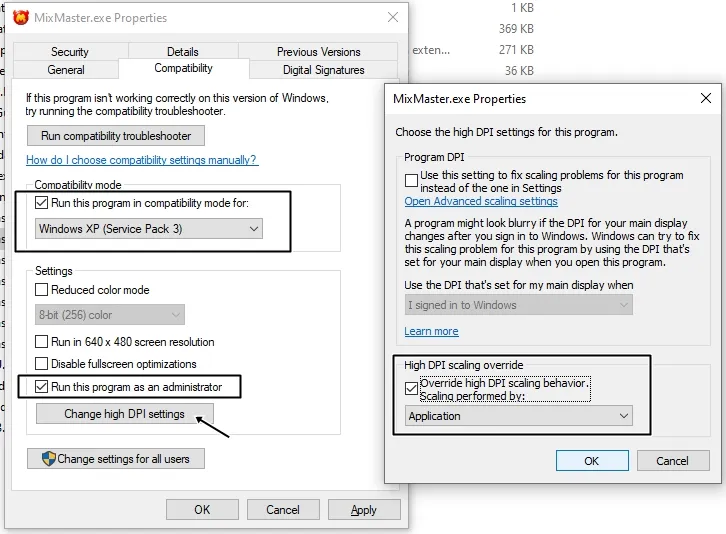
Check "Run this program in compatibility mode".
Check "Run this program as administrator" in the settings.
Change the high DPI settings.
OR follow the image below:
 Remember:
This procedure must be done in the game folder files, not in the shortcuts found on the desktop.
This is a common issue on Windows 10 or Windows 11. To fix it, simply follow the steps below:
- Open the game installation folder.
- Locate and right-click on MixMaster.exe (MixMaster Application) to open Properties, make the following changes, and then try starting the game in both fullscreen and windowed mode:
Check "Run this program in compatibility mode".
Check "Run this program as administrator" in the settings.
Change the high DPI settings.
OR follow the image below:
Remember: This procedure must be done in the game folder files, not in the shortcuts found on the desktop.